
No-code maps for real-world businesses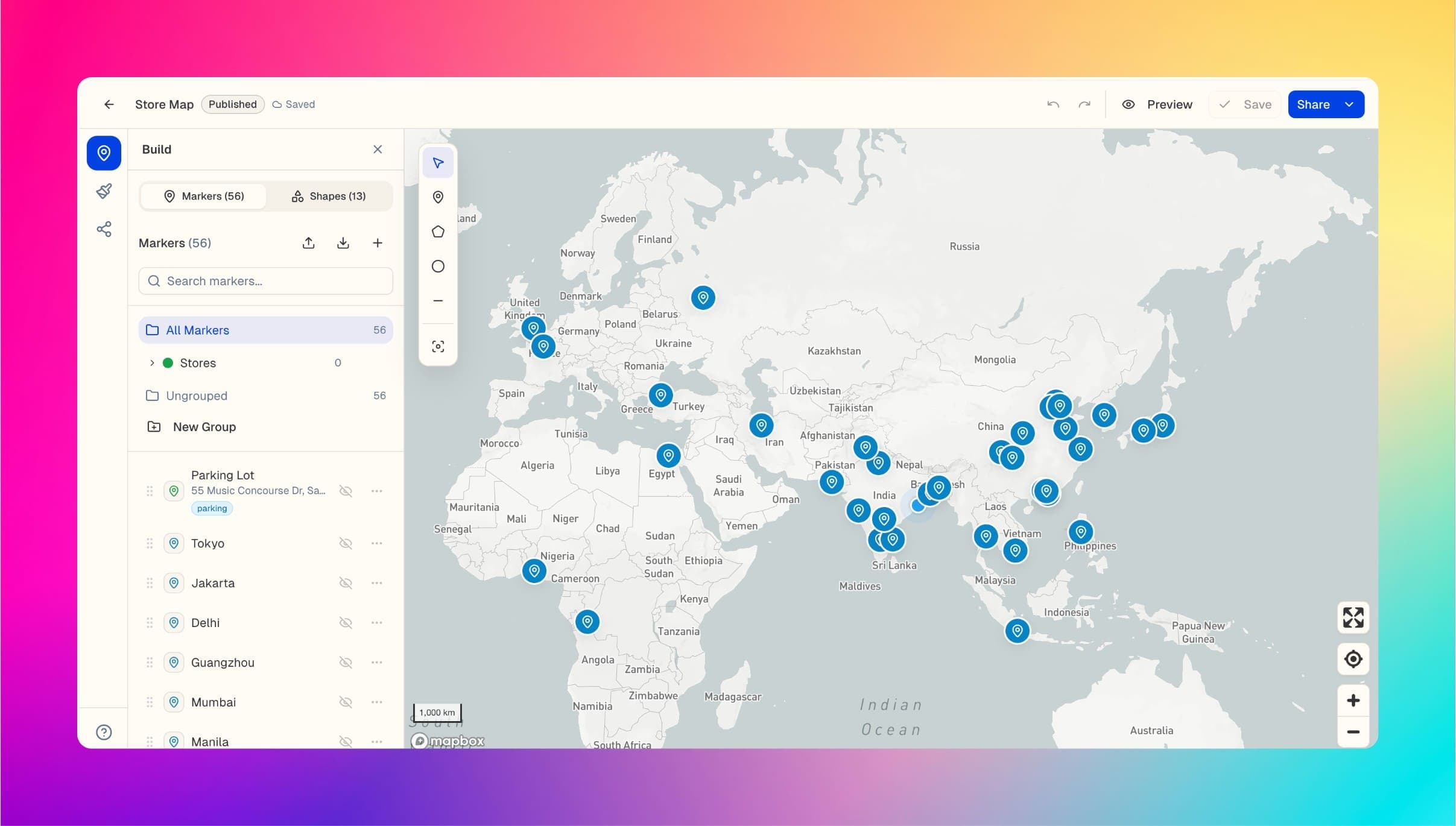
Create a store locatorin minutes. Embed anywhere.
Turn your locations into customers. Build branded, searchable maps visitors actually use — no code needed.
No credit cardFree planExport your data anytime
CSV imported56 locations ready
Search + filters
Embed MapsMaker wherever your website lives
WordPressWebflowShopifySquarespaceWixCustom sites
From a spreadsheet to a useful map in three steps
Start with the structure you need, add your locations, and publish a map that feels built for your website.
01
Choose your map
Start with a store locator, service area, event, travel, or directory template.
02
Bring in locations
Upload a CSV, add places manually, or keep data synced from Google Sheets on Pro.
03
Brand it and publish
Style the map, preview every screen, then share a link or paste one embed on your site.
One map builder. A hundred ways to make locations useful.
Choose the experience your visitors need, then make it unmistakably yours.
Retail & franchisesStore locatorHelp customers find the right location with search, filters, opening hours, and one-tap directions.Field & service teamsService area mapMake coverage clear with polygons, circles, routes, and branded territory maps.Events & destinationsVisitor guidePut venues, parking, hotels, attractions, and helpful details in one mobile-friendly map.Listings & communitiesDirectory mapTurn a collection of places into a searchable directory with rich cards and useful categories.
Retail & franchises
Search locations...
Store locatorBuild, brand, publish, and improve — without map-tool sprawl
The editor and the visitor experience stay connected from your first location to every click after launch.
Search + filters
Help people find the right place, fast
MapsMaker turns pins into a useful decision tool, so visitors can search, compare, and act without leaving your site.
- Keyword search, groups, tags, and filters
- Rich cards with photos, hours, ratings, and CTAs
- One-tap directions to Google Maps or Apple Maps
Everything your map needs to drive the next action
The full MapsMaker feature set, from importing and organizing locations to publishing, measuring, and keeping maps current.
CSV import + geocoding
Upload hundreds of locations at once and turn addresses into map-ready coordinates.
Google Sheets sync
Keep a connected spreadsheet and your published map aligned as location data changes.
Brand styling
Control colors, marker shapes, icons, imagery, fonts, and multiple base map styles.
Search, filters + directions
Help visitors narrow locations, explore the list, and open turn-by-turn directions.
Shapes + coverage zones
Draw polygons, circles, lines, routes, delivery zones, and service boundaries.
Clustering + groups
Keep dense maps readable and organize locations into clear, toggleable categories.
Rich location cards
Show photos, video, hours, amenities, ratings, social links, prices, and CTA buttons.
Conversion analytics
Track map views, marker opens, directions, and contact or website clicks.
One-line embed
Publish to WordPress, Webflow, Shopify, Squarespace, Wix, or a custom website.
Your map should do more than show pins
Replace a generic embed with an experience that helps visitors choose a location and take the next step.
- Fixed styling that feels disconnected
- Pins without useful context
- No search, filters, or conversion actions
- Brand-matched colors, markers, and cards
- Searchable, filterable location experience
- Directions, contact details, and clear CTAs
Start with the right map, not a blank canvas
Each template starts with the layout, fields, and visitor tools that make sense for the job.
Explore every use case


Your map does the heavy lifting
Give visitors a faster path from finding a location to getting directions, calling, or clicking through.
From signup to a published, embeddable map
Locations imported in one CSV upload with geocoding
Directions to Google Maps or Apple Maps from a location card
Base map styles including streets, light, dark, outdoors, and satellite
Start free. Upgrade when the map becomes part of your business.
No credit card to start. Paid plans include a 7-day free trial.
Free
Explore the editor
$0
- 1 map
- 10 markers
- Static share page + location list
Starter
For creators and small businesses
$15/month
- 5 interactive maps
- 100 markers per map
- Website embeds + 2,000 monthly loads
- CSV import and rich location cards
Pro
For growing teams
$49/month
- 25 maps and 500 markers per map
- Team workspaces and role-based editing
- Google Sheets, API, and webhooks
- Bring your own Mapbox key
Business
For organizations
$99/month
- Unlimited maps
- 2,000 markers per map
- Branded custom map domain
- Custom CSS and advanced embed security
Need the full feature and limit comparison? See all plan details.
Questions before you put a map on your site
Straight answers about setup, embeds, usage, and what the free plan includes.
Ask us something elseWhat can I build with MapsMaker?
You can build store locators, service area maps, event guides, real estate and directory maps, travel maps, and other location-based experiences. Start from a template or from a blank map.
Will it work with my website?
Yes. Paid plans include a responsive HTML embed that works anywhere you can add custom HTML, including WordPress, Webflow, Shopify, Squarespace, Wix, and custom websites.
How does the free plan work?
The free plan lets you create one map with up to 10 markers and share it as a static map with a searchable location list. Upgrade when you need a fully interactive map or a website embed.
Do I need my own Mapbox account?
No. Paid plans include interactive map loads, so you can publish without setting up Mapbox yourself. Pro and Business also let you bring your own Mapbox key for additional usage.
What happens if I reach my monthly map-load limit?
The map falls back to a static view with a searchable location list for the rest of the month. Your locations are not deleted, and you can upgrade or use your own Mapbox key on eligible plans.
Your locations deserve more than a generic embed.
Build the map your visitors need. Start free and publish when it feels right.
No credit card · Keep your data · Upgrade anytime